Sibeesh Passion

Top Menu

  • Home
  • Search
  • About
  • Privacy Policy

Main Menu

  • Articles
    • Azure
    • .NET
    • IoT
    • JavaScript
    • Career Advice
    • Interview
    • Angular
    • Node JS
    • JQuery
    • Knockout JS
    • Jasmine Framework
    • SQL
    • MongoDB
    • MySQL
    • WordPress
  • Contributions
    • Medium
    • GitHub
    • Stack Overflow
    • Unsplash
    • ASP.NET Forum
    • C# Corner
    • Code Project
    • DZone
    • MSDN
  • Social Media
    • LinkedIn
    • Facebook
    • Instagram
    • Twitter
  • YouTube
    • Sibeesh Venu
    • Sibeesh Passion
  • Awards
  • Home
  • Search
  • About
  • Privacy Policy

logo

Sibeesh Passion

  • Articles
    • Azure
    • .NET
    • IoT
    • JavaScript
    • Career Advice
    • Interview
    • Angular
    • Node JS
    • JQuery
    • Knockout JS
    • Jasmine Framework
    • SQL
    • MongoDB
    • MySQL
    • WordPress
  • Contributions
    • Medium
    • GitHub
    • Stack Overflow
    • Unsplash
    • ASP.NET Forum
    • C# Corner
    • Code Project
    • DZone
    • MSDN
  • Social Media
    • LinkedIn
    • Facebook
    • Instagram
    • Twitter
  • YouTube
    • Sibeesh Venu
    • Sibeesh Passion
  • Awards
  • Linux Azure Function Isolated Dot Net 9 YAML Template Deployment

  • Build, Deploy, Configure CI &CD Your Static Website in 5 mins

  • Post Messages to Microsoft Teams Using Python

  • Get Azure Blob Storage Blob Metadata Using PowerShell

  • Deploy .net 6 App to Azure from Azure DevOps using Pipelines

ArduinoAzureIoT
Home›Arduino›Detect Noise Level Audio Decibels in MXChip Azure IoT DevKit

Detect Noise Level Audio Decibels in MXChip Azure IoT DevKit
By SibeeshVenu
January 14, 2019
579
0
Share:
Send MXChip Data to Cloud

[toc]

Introduction

Playing with Azure IoT DevKit MXChip is always fun, the device has many capabilities. For the past few days, I have been working with some of the capabilities of this device like Atmospheric pressure, Temperature, Humidity through its Sensors. In this Article, I will show you how you can calculate the noise level using the microphone of AZ3166 IoT Device. Now let’s start implementing the same. I hope you will like it.

Background

In our last article, we have already seen how to read the temperature, humidity, atmospheric pressure from the MXChip AZ3166 sensors and send those to our Azure IoT Hub. Here in this article let’s do the following tasks.

  1. Find the Noise level using the AudioClassV2 class
  2. Send the Values to our IoT Hub

Source Code

Please feel free to play around with this repository.

Using the Code

Once you have your own work space, we can open the solution in VSCode and start coding.

main.ino

This is our solution starting point, every project must have its own sketch file, usually this file will be containing at least the functions loop() and setup().

Before we get started, let’s include the header files we are going to use.

Now we can declare our constants and variables.

Now we can add the codes for the configuration, usually, you wouldn’t have to edit any codes in this section.

As I mentioned earlier, every INO file will have its own setup() and loop() function. We can modify our setup() function as below.

The function loop() will be called each 5 seconds, as I had set the INTERVAL as 5000 milliseconds.

Now we can edit our code of loop() function as below.

utility.cpp

As you can see, once we get the values from the function get_prediction (), we are passing the decibels values to our setMessage() function, which we have defined in the file utility.cpp. Inside the setMessage () function, we will add the decibels value to JSON object using the function json_object_set_number ().

You should also add the files featurizer.h and featurizer.s to get it working. You can get those files from the source code repository mentioned above.

Compile and Upload to the Device

As we have already made the needed changes, it is time to compile the Device solution and upload the same to our Device. Press F1 and select Azure IoT Device Workbench: Compile Device Code. If you ever get an error as “error: utility.h: No such file or directory”, please compile the device code again. If you are facing any unexpected errors, please delete the “.build” folder and compile again.

Once you get a message as ” [Done] Finished verify sketch – Main.ino ” in your Output window, you can upload the solution to your device. To do so, press F1 again, and select ” Azure IoT Device Workbench: Upload Device Code”. Please make sure that the device is been connected to your machine. If everything goes well, you will be getting a message as ” [Done] Uploaded the sketch: Main.ino”.

Please remember to see the GitHub repository for the full code.

Device to Cloud Messages

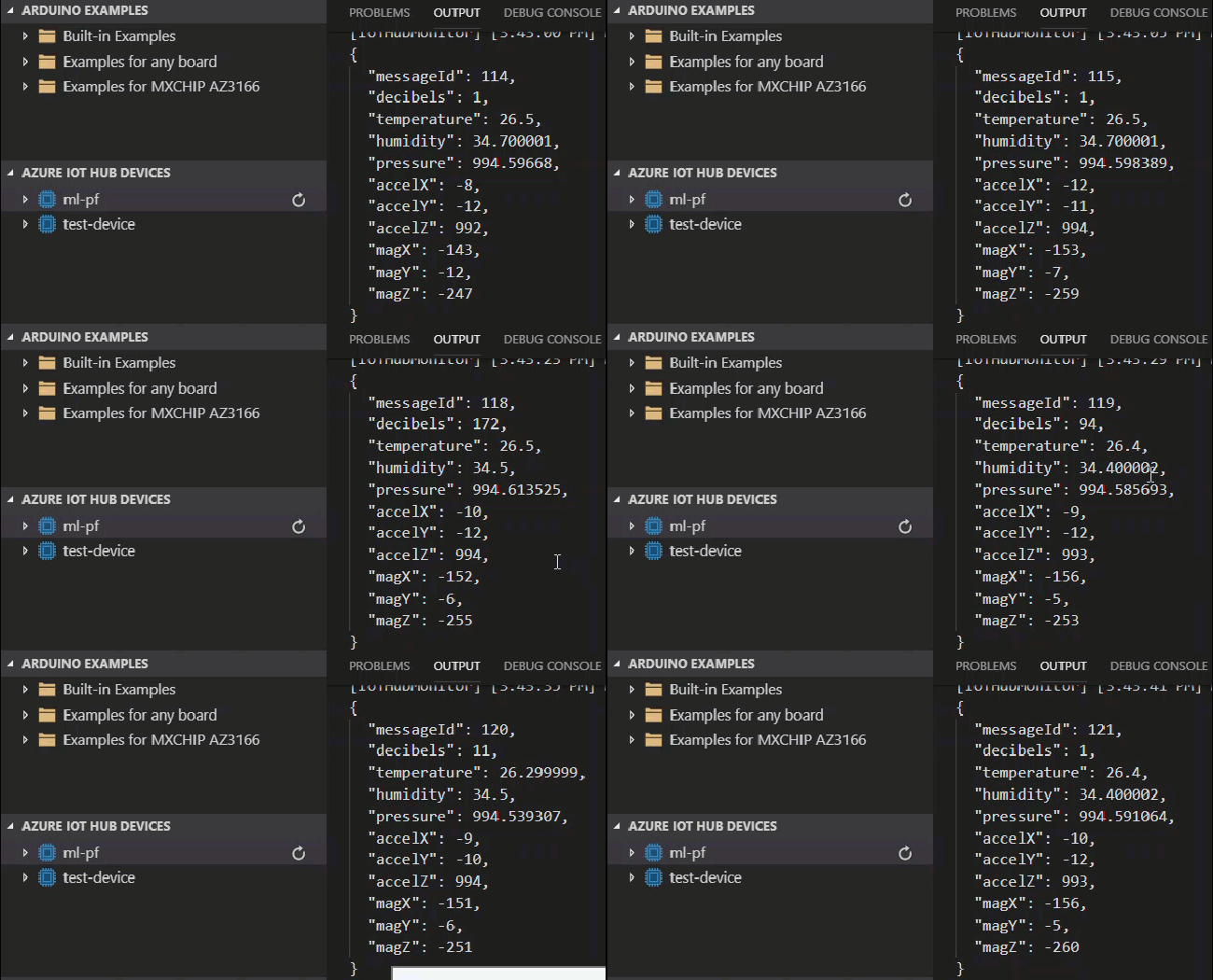
Now your device will be sending the Decibels data to the Azure IoT Hub. Let’s see that in the D2C Monitoring window.
Send MXChip Data to Cloud

Conclusion

Wow!. Now we have learned,

  • How to detect the noise level in MXChip
  • How to use AudioClassV2
  • How to send device data to the Azure IoT Hub

Please consider reading my IoT articles here for the continuation.

Your turn. What do you think?

Thanks a lot for reading. Did I miss anything that you may think which is needed in this article? Could you find this post as useful? Kindly do not forget to share me your feedback.

Kindest Regards
Sibeesh Venu

TagsAudioClassV2AZ3166AzureAzure IoTCalculate DecibelsIoT HubMXChipNoise Level Detector
Previous Article

Deploy Angular App Using Azure DevOps Build ...

Next Article

Create Your Own Cryptocurrency in Private Consortium ...

0
Shares
  • 0
  • +
  • 0
  • 0
  • 0

SibeeshVenu

I am Sibeesh Venu, an engineer by profession and writer by passion. Microsoft MVP, Author, Speaker, Content Creator, Youtuber, Programmer.

Related articles More from author

  • AzureVideos

    Encrypt an Azure Virtual Machine VHD File in 5 Minutes

    September 3, 2019
    By SibeeshVenu
  • Azure

    Secure Serverless Azure Functions AppSetting Using Key Vault

    July 5, 2019
    By SibeeshVenu
  • Azure

    Creating a Simple Windows Application Using Azure

    April 29, 2015
    By SibeeshVenu
  • Back Up And Restore Your Old MySQL Database to New Database
    AzureDatabaseMySQLVirtual Machine

    Back Up your ClearDB and restore in Azure Virtual Machine MySQL

    September 18, 2015
    By SibeeshVenu
  • VM IP configuration
    Azure

    Creating an Azure VM from the VHDX/VHD File

    March 6, 2019
    By SibeeshVenu
  • .NETAsp.Net CoreAzure

    Asp.Net Core Windows Service Task Quartz.Net With Database

    August 29, 2019
    By SibeeshVenu
0

My book

Asp Net Core and Azure with Raspberry Pi Sibeesh Venu

YouTube

MICROSOFT MVP (2016-2022)

profile for Sibeesh Venu - Microsoft MVP

Recent Posts

  • React Native Android Release with Azure DevOps and Google Play Store
  • Linux Azure Function Isolated Dot Net 9 YAML Template Deployment
  • Build, Deploy, Configure CI &CD Your Static Website in 5 mins
  • Easily move data from one COSMOS DB to another
  • .NET 8 New and Efficient Way to Check IP is in Given IP Range
  • Async Client IP safelist for Dot NET
  • Post Messages to Microsoft Teams Using Python
  • Get Azure Blob Storage Blob Metadata Using PowerShell
  • Deploy .net 6 App to Azure from Azure DevOps using Pipelines
  • Integrate Azure App Insights in 1 Minute to .Net6 Application

Tags

Achievements (35) Angular (14) Angular 5 (7) Angular JS (15) article (10) Article Of The Day (13) Asp.Net (14) Azure (65) Azure DevOps (10) Azure Function (10) Azure IoT (7) C# (17) c-sharp corner (13) Career Advice (11) chart (11) CSharp (7) CSS (7) CSS3 (6) HighChart (10) How To (9) HTML5 (10) HTML5 Chart (11) Interview (6) IoT (11) Javascript (10) JQuery (82) jquery functions (9) JQWidgets (15) JQX Grid (17) Json (7) Microsoft (8) MVC (20) MVP (9) MXChip (7) News (18) Office 365 (7) Products (10) SQL (20) SQL Server (15) Visual Studio (10) Visual Studio 2017 (7) VS2017 (7) Web API (12) Windows 10 (7) Wordpress (9)
  • .NET
  • Achievements
  • ADO.NET
  • Android
  • Angular
  • Arduino
  • Article Of The Day
  • ASP.NET
  • Asp.Net Core
  • Automobile
  • Awards
  • Azure
  • Azure CDN
  • azure devops
  • Blockchain
  • Blog
  • Browser
  • C-Sharp Corner
  • C#
  • Career Advice
  • Code Snippets
  • CodeProject
  • Cognitive Services
  • Cosmos DB
  • CSS
  • CSS3
  • Data Factory
  • Database
  • Docker
  • Drawings
  • Drill Down Chart
  • English
  • Excel Programming
  • Exporting
  • Facebook
  • Fun
  • Gadgets
  • GitHub
  • GoPro
  • High Map
  • HighChart
  • How to
  • HTML
  • HTML5
  • Ignite UI
  • IIS
  • Interview
  • IoT
  • JavaScript
  • JQuery
  • jQuery UI
  • JQWidgets
  • JQX Grid
  • Json
  • Knockout JS
  • Linux
  • Machine Learning
  • Malayalam
  • Malayalam Poems
  • MDX Query
  • Microsoft
  • Microsoft ADOMD
  • Microsoft MVP
  • Microsoft Office
  • Microsoft Technologies
  • Microsoft Windows
  • Microsoft Windows Server
  • Mobile
  • MongoDB
  • Monthly Winners
  • MVC
  • MVC Grid
  • MySQL
  • News
  • Node JS
  • npm
  • Number Conversions
  • October 2015
  • Office 365
  • Office Development
  • One Plus
  • Outlook
  • Page
  • PHP
  • Poems
  • PowerShell
  • Products
  • Q&A
  • Raspberry PI
  • React
  • SEO
  • SharePoint
  • Skype
  • Social Media
  • Software
  • Spire.Doc
  • Spire.PDF
  • Spire.XLS
  • SQL
  • SQL Server
  • SSAS
  • SSMS
  • Storage In HTML5
  • Stories
  • Third Party Software Apps
  • Tips
  • Tools
  • Translator Text
  • Uncategorized
  • Unit Testing
  • UWP
  • VB.Net
  • Videos
  • Virtual Machine
  • Visual Studio
  • Visual Studio 2017
  • Wamp Server
  • Web API
  • Web Platform Installer
  • Webinars
  • WebMatrix
  • Windows 10
  • Windows 7
  • Windows 8.1
  • Wordpress
  • Writing

ABOUT ME

I am Sibeesh Venu, an engineer by profession and writer by passion. Microsoft MVP, Author, Speaker, Content Creator, Youtuber, Programmer. If you would like to know more about me, you can read my story here.

Contact Me

  • info@sibeeshpassion.com

Pages

  • About
  • Search
  • Privacy Policy
  • About
  • Search
  • Privacy Policy
© Copyright Sibeesh Passion 2014-2025. All Rights Reserved.
Go to mobile version