Angular JS AutoComplete In MVC With Web API
In this article we will learn how we can create Angular JS autoComplete text box with the data from SQL Server database. We use MVC architecture with Web API and Angular JS to fetch the data and do all the manipulations. I am creating this application in Visual Studio 2015. You can always get the tips/tricks/blogs about these mentioned technologies from the links given below.
Now we will go and create our application. I hope you will like this.
Download the source code
You can always download the source code here.
Background
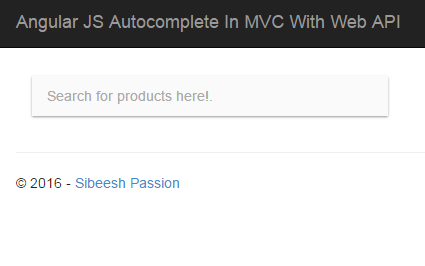
For the past few days I am experiment few things in Angular JS. Here we are going to see a demo of how to use Angular JS autocomplete in MVC with Web API to fetch the data from database. Once we are done, this is how our applications output will be.
Angular_JS_Autocomplete_In_MVC_With_Web_API_Output_
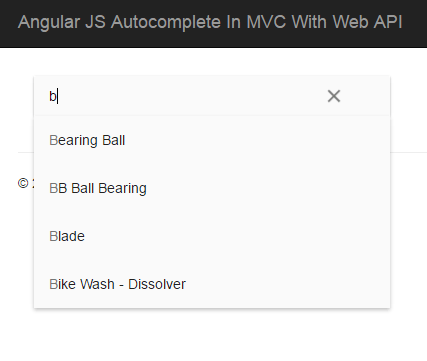
Angular_JS_Autocomplete_In_MVC_With_Web_API_Output_With_Filter_
Create a MVC application
Click File-> New-> Project then select MVC application. From the following pop up we will select the template as empty and select the core references and folders for MVC.
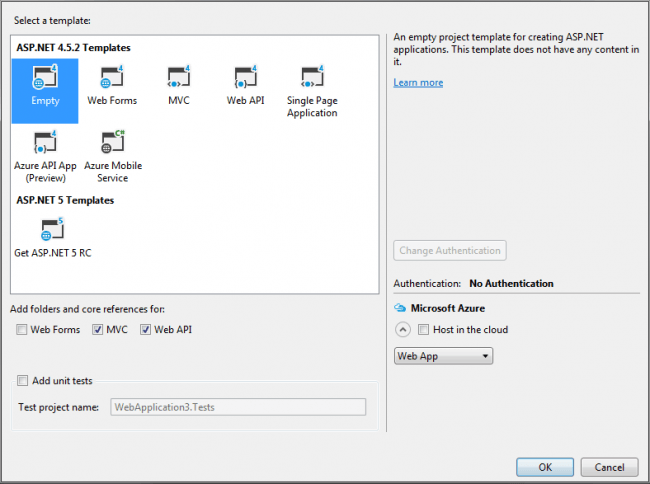
Empty Template With MVC And Web API Folders
Once you click OK, a project with MVC like folder structure with core references will be created for you.
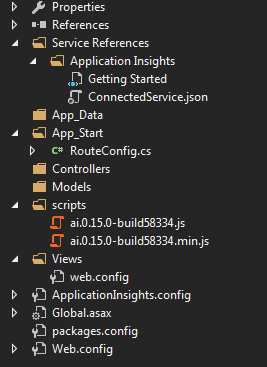
Folder Structure And References For Empty MVC Project
Before going to start the coding part, make sure that all the required extensions/references are installed. Below are the required things to start with.
You can all the items mentioned above from NuGet. Right click on your project name and select Manage NuGet packages.
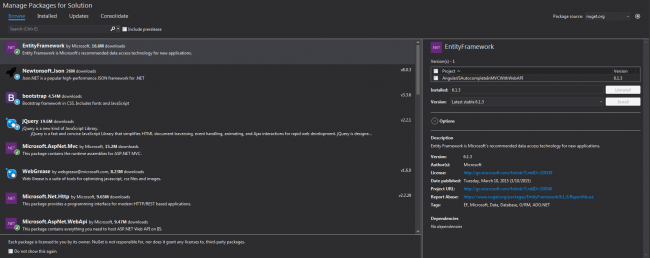
Manage NuGet Package Window
Once you have installed those items, please make sure that all the items(jQuery, Angular JS files) are loaded in your scripts folder.
Using the code
As I have said before, we are going to use Angular JS for our client side operations, so it is better to create the Angular JS script files first right? Just to make sure that we have got all the required things :). For that I am going to create a script file called Home.js in which we will write our scripts. Sounds good? Yes, we have set everything to get started our coding. Now we will create a Web API controller and get the data from database in JSON format. Let’s start then.
We will set up our database first so that we can create Entity Model for our application later.
Create a database
The following query can be used to create a database in your SQL Server.
[sql]
USE [master]
GO
/****** Object: Database [TrialsDB]
CREATE DATABASE [TrialsDB]
CONTAINMENT = NONE
ON PRIMARY
( NAME = N’TrialsDB’, FILENAME = N’C:\Program Files\Microsoft SQL Server\MSSQL11.MSSQLSERVER\MSSQL\DATA\TrialsDB.mdf’ , SIZE = 3072KB , MAXSIZE = UNLIMITED, FILEGROWTH = 1024KB )
LOG ON
( NAME = N’TrialsDB_log’, FILENAME = N’C:\Program Files\Microsoft SQL Server\MSSQL11.MSSQLSERVER\MSSQL\DATA\TrialsDB_log.ldf’ , SIZE = 1024KB , MAXSIZE = 2048GB , FILEGROWTH = 10%)
GO
ALTER DATABASE [TrialsDB] SET COMPATIBILITY_LEVEL = 110
GO
IF (1 = FULLTEXTSERVICEPROPERTY(‘IsFullTextInstalled’))
begin
EXEC [TrialsDB].[dbo].[sp_fulltext_database] @action = ‘enable’
end
GO
ALTER DATABASE [TrialsDB] SET ANSI_NULL_DEFAULT OFF
GO
ALTER DATABASE [TrialsDB] SET ANSI_NULLS OFF
GO
ALTER DATABASE [TrialsDB] SET ANSI_PADDING OFF
GO
ALTER DATABASE [TrialsDB] SET ANSI_WARNINGS OFF
GO
ALTER DATABASE [TrialsDB] SET ARITHABORT OFF
GO
ALTER DATABASE [TrialsDB] SET AUTO_CLOSE OFF
GO
ALTER DATABASE [TrialsDB] SET AUTO_CREATE_STATISTICS ON
GO
ALTER DATABASE [TrialsDB] SET AUTO_SHRINK OFF
GO
ALTER DATABASE [TrialsDB] SET AUTO_UPDATE_STATISTICS ON
GO
ALTER DATABASE [TrialsDB] SET CURSOR_CLOSE_ON_COMMIT OFF
GO
ALTER DATABASE [TrialsDB] SET CURSOR_DEFAULT GLOBAL
GO
ALTER DATABASE [TrialsDB] SET CONCAT_NULL_YIELDS_NULL OFF
GO
ALTER DATABASE [TrialsDB] SET NUMERIC_ROUNDABORT OFF
GO
ALTER DATABASE [TrialsDB] SET QUOTED_IDENTIFIER OFF
GO
ALTER DATABASE [TrialsDB] SET RECURSIVE_TRIGGERS OFF
GO
ALTER DATABASE [TrialsDB] SET DISABLE_BROKER
GO
ALTER DATABASE [TrialsDB] SET AUTO_UPDATE_STATISTICS_ASYNC OFF
GO
ALTER DATABASE [TrialsDB] SET DATE_CORRELATION_OPTIMIZATION OFF
GO
ALTER DATABASE [TrialsDB] SET TRUSTWORTHY OFF
GO
ALTER DATABASE [TrialsDB] SET ALLOW_SNAPSHOT_ISOLATION OFF
GO
ALTER DATABASE [TrialsDB] SET PARAMETERIZATION SIMPLE
GO
ALTER DATABASE [TrialsDB] SET READ_COMMITTED_SNAPSHOT OFF
GO
ALTER DATABASE [TrialsDB] SET HONOR_BROKER_PRIORITY OFF
GO
ALTER DATABASE [TrialsDB] SET RECOVERY FULL
GO
ALTER DATABASE [TrialsDB] SET MULTI_USER
GO
ALTER DATABASE [TrialsDB] SET PAGE_VERIFY CHECKSUM
GO
ALTER DATABASE [TrialsDB] SET DB_CHAINING OFF
GO
ALTER DATABASE [TrialsDB] SET FILESTREAM( NON_TRANSACTED_ACCESS = OFF )
GO
ALTER DATABASE [TrialsDB] SET TARGET_RECOVERY_TIME = 0 SECONDS
GO
ALTER DATABASE [TrialsDB] SET READ_WRITE
GO
[/sql]
Now we will create the table we needed. As of now I am going to create the table Products
Create tables in database
Below is the query to create the table Product.
[sql]
USE [TrialsDB]
GO
/****** Object: Table [dbo].[Product]
SET ANSI_NULLS ON
GO
SET QUOTED_IDENTIFIER ON
GO
CREATE TABLE [dbo].[Product](
[ProductID] [int] NOT NULL,
[Name] [nvarchar](max) NOT NULL,
[ProductNumber] [nvarchar](25) NOT NULL,
[MakeFlag] [bit] NOT NULL,
[FinishedGoodsFlag] [bit] NOT NULL,
[Color] [nvarchar](15) NULL,
[SafetyStockLevel] [smallint] NOT NULL,
[ReorderPoint] [smallint] NOT NULL,
[StandardCost] [money] NOT NULL,
[ListPrice] [money] NOT NULL,
[Size] [nvarchar](5) NULL,
[SizeUnitMeasureCode] [nchar](3) NULL,
[WeightUnitMeasureCode] [nchar](3) NULL,
[Weight] [decimal](8, 2) NULL,
[DaysToManufacture] [int] NOT NULL,
[ProductLine] [nchar](2) NULL,
[Class] [nchar](2) NULL,
[Style] [nchar](2) NULL,
[ProductSubcategoryID] [int] NULL,
[ProductModelID] [int] NULL,
[SellStartDate] [datetime] NOT NULL,
[SellEndDate] [datetime] NULL,
[DiscontinuedDate] [datetime] NULL,
[rowguid] [uniqueidentifier] ROWGUIDCOL NOT NULL,
[ModifiedDate] [datetime] NOT NULL
) ON [PRIMARY] TEXTIMAGE_ON [PRIMARY]
GO
[/sql]
Can we insert some data to the tables now?
Insert data to table
You can use the below query to insert the data to the table Product
[sql]
USE [TrialsDB]
GO
INSERT INTO [dbo].[Product]
([ProductID]
,[Name]
,[ProductNumber]
,[MakeFlag]
,[FinishedGoodsFlag]
,[Color]
,[SafetyStockLevel]
,[ReorderPoint]
,[StandardCost]
,[ListPrice]
,[Size]
,[SizeUnitMeasureCode]
,[WeightUnitMeasureCode]
,[Weight]
,[DaysToManufacture]
,[ProductLine]
,[Class]
,[Style]
,[ProductSubcategoryID]
,[ProductModelID]
,[SellStartDate]
,[SellEndDate]
,[DiscontinuedDate]
,[rowguid]
,[ModifiedDate])
VALUES
(<ProductID, int,>
,<Name, nvarchar(max),>
,<ProductNumber, nvarchar(25),>
,<MakeFlag, bit,>
,<FinishedGoodsFlag, bit,>
,<Color, nvarchar(15),>
,<SafetyStockLevel, smallint,>
,<ReorderPoint, smallint,>
,<StandardCost, money,>
,<ListPrice, money,>
,<Size, nvarchar(5),>
,<SizeUnitMeasureCode, nchar(3),>
,<WeightUnitMeasureCode, nchar(3),>
,<Weight, decimal(8,2),>
,<DaysToManufacture, int,>
,<ProductLine, nchar(2),>
,<Class, nchar(2),>
,<Style, nchar(2),>
,<ProductSubcategoryID, int,>
,<ProductModelID, int,>
,<SellStartDate, datetime,>
,<SellEndDate, datetime,>
,<DiscontinuedDate, datetime,>
,<rowguid, uniqueidentifier,>
,<ModifiedDate, datetime,>)
GO
[/sql]
So let us say, we have inserted the data as follows. If you feel bored of inserting data manually, you can always run the SQL script file attached which has the insertion queries. Just run that, you will be all OK. If you don’t know how to generate SQL scripts with data, I strongly recommend you to have a read here
Next thing we are going to do is creating a ADO.NET Entity Data Model.
Create Entity Data Model
Right click on your model folder and click new, select ADO.NET Entity Data Model. Follow the steps given. Once you have done the processes, you can see the edmx file and other files in your model folder. Here I gave Dashboard for our Entity data model name. Now you can see a file with edmx extension have been created. If you open that file, you can see as below.
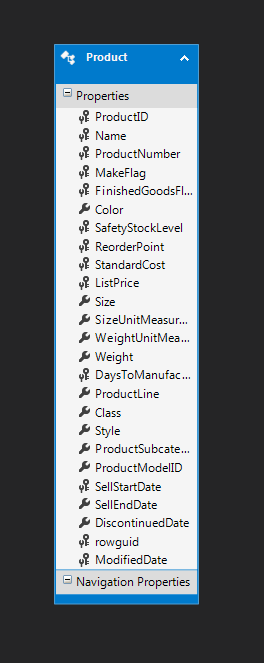
Entity Data Model Product Table
Now will create our Web API controller.
Create Web API Controller
To create a Web API controller, just right click on your controller folder and click Add -> Controller -> Select Web API 2 controller with actions, using Entity Framework.
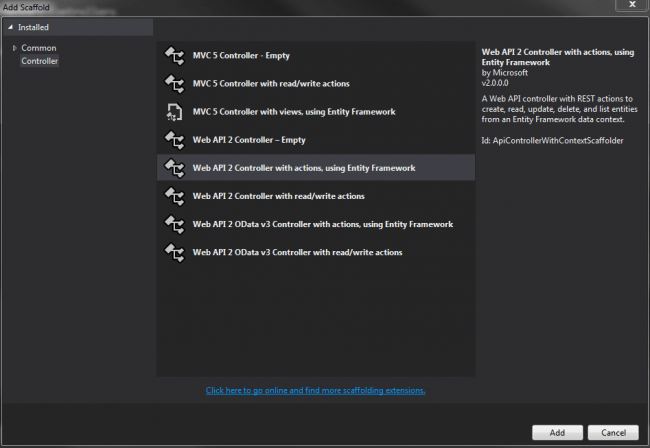
Web API 2 Controller With Actions Using Entity Framework
Now select Product (AngularJSAutocompleteInMVCWithWebAPI.Models) as our Model class and TrialsDBEntities (AngularJSAutocompleteInMVCWithWebAPI.Models) as data context class.
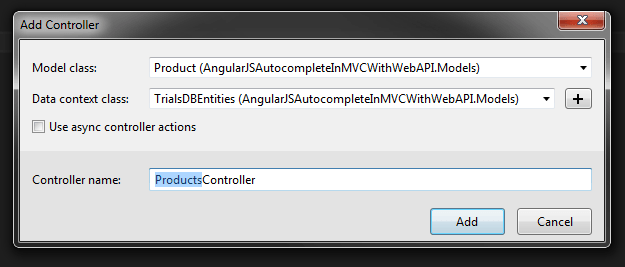
Model Class And Data Context Class
As you can see It has been given the name of our controller as Products. Here I am not going to change that, if you wish to change, you can do that.
Now you will be given the following codes in our new Web API controller.
[csharp]
using System;
using System.Collections.Generic;
using System.Data;
using System.Data.Entity;
using System.Data.Entity.Infrastructure;
using System.Linq;
using System.Net;
using System.Net.Http;
using System.Web.Http;
using System.Web.Http.Description;
using AngularJSAutocompleteInMVCWithWebAPI.Models;
namespace AngularJSAutocompleteInMVCWithWebAPI.Controllers
{
public class ProductsController : ApiController
{
private TrialsDBEntities db = new TrialsDBEntities();
// GET: api/Products
public IQueryable<Product> GetProducts()
{
return db.Products;
}
// GET: api/Products/5
[ResponseType(typeof(Product))]
public IHttpActionResult GetProduct(int id)
{
Product product = db.Products.Find(id);
if (product == null)
{
return NotFound();
}
return Ok(product);
}
// PUT: api/Products/5
[ResponseType(typeof(void))]
public IHttpActionResult PutProduct(int id, Product product)
{
if (!ModelState.IsValid)
{
return BadRequest(ModelState);
}
if (id != product.ProductID)
{
return BadRequest();
}
db.Entry(product).State = EntityState.Modified;
try
{
db.SaveChanges();
}
catch (DbUpdateConcurrencyException)
{
if (!ProductExists(id))
{
return NotFound();
}
else
{
throw;
}
}
return StatusCode(HttpStatusCode.NoContent);
}
// POST: api/Products
[ResponseType(typeof(Product))]
public IHttpActionResult PostProduct(Product product)
{
if (!ModelState.IsValid)
{
return BadRequest(ModelState);
}
db.Products.Add(product);
try
{
db.SaveChanges();
}
catch (DbUpdateException)
{
if (ProductExists(product.ProductID))
{
return Conflict();
}
else
{
throw;
}
}
return CreatedAtRoute("DefaultApi", new { id = product.ProductID }, product);
}
// DELETE: api/Products/5
[ResponseType(typeof(Product))]
public IHttpActionResult DeleteProduct(int id)
{
Product product = db.Products.Find(id);
if (product == null)
{
return NotFound();
}
db.Products.Remove(product);
db.SaveChanges();
return Ok(product);
}
protected override void Dispose(bool disposing)
{
if (disposing)
{
db.Dispose();
}
base.Dispose(disposing);
}
private bool ProductExists(int id)
{
return db.Products.Count(e => e.ProductID == id) > 0;
}
}
}
[/csharp]
As we are not going to use only read operation, you can remove other functionalities and keep only Get methods.
[csharp]
// GET: api/Products
public IQueryable<Product> GetProducts()
{
return db.Products;
}
[/csharp]
So the coding part to fetch the data from database is ready, now we need to check whether our Web API is ready for action!. To check that, you just need to run the URL http://localhost:9038/api/products. Here products is our Web API controller name. I hope you get the data as a result.
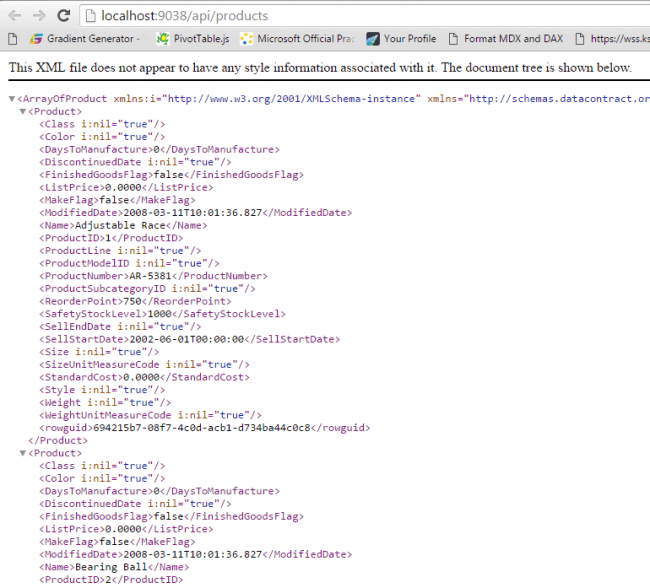
Web API Result
Now we will go back to our angular JS file and consume this Web API. You need to change the scripts in the Home.js as follows.
[js]
(function () {
‘use strict’;
angular
.module(‘MyApp’, [‘ngMaterial’, ‘ngMessages’, ‘material.svgAssetsCache’])
.controller(‘AutoCompleteCtrl’, AutoCompleteCtrl);
function AutoCompleteCtrl($http, $timeout, $q, $log) {
var self = this;
self.simulateQuery = true;
self.products = loadAllProducts($http);
self.querySearch = querySearch;
function querySearch(query) {
var results = query ? self.products.filter(createFilterFor(query)) : self.products, deferred;
if (self.simulateQuery) {
deferred = $q.defer();
$timeout(function () { deferred.resolve(results); }, Math.random() * 1000, false);
return deferred.promise;
} else {
return results;
}
}
function loadAllProducts($http) {
var allProducts = [];
var url = ”;
var result = [];
url = ‘api/products’;
$http({
method: ‘GET’,
url: url,
}).then(function successCallback(response) {
allProducts = response.data;
angular.forEach(allProducts, function (product, key) {
result.push(
{
value: product.Name.toLowerCase(),
display: product.Name
});
});
}, function errorCallback(response) {
console.log(‘Oops! Something went wrong while fetching the data. Status Code: ‘ + response.status + ‘ Status statusText: ‘ + response.statusText);
});
return result;
}
function createFilterFor(query) {
var lowercaseQuery = angular.lowercase(query);
return function filterFn(product) {
return (product.value.indexOf(lowercaseQuery) === 0);
};
}
}
})();
[/js]
Here MyApp is our module name and AutoCompleteCtrl is our controller name. The function loadAllProducts is for loading the products from database using $http in Angular JS.
Once our service is called, we will get the data in return. We will parse the same and store it in a variable for future use. We will loop through the same using angular.forEach and format as needed.
[js]
angular.forEach(allProducts, function (product, key) {
result.push(
{
value: product.Name.toLowerCase(),
display: product.Name
});
});
[/js]
The function querySearch will be called when ever user search for any particular products. This we will call from the view as follows.
[html]
md-items="item in ctrl.querySearch(ctrl.searchText)"
[/html]
Now we need a view to show our data right? Yes, we need a controller too!.
Create a MVC controller
To create a controller, we need to right click on the controller folder, Add – Controller. I hope you will be given a controller as follows.
[csharp]
using System;
using System.Collections.Generic;
using System.Linq;
using System.Web;
using System.Web.Mvc;
namespace AngularJSAutocompleteInMVCWithWebAPI.Controllers
{
public class HomeController : Controller
{
// GET: Home
public ActionResult Index()
{
return View();
}
}
}
[/csharp]
Here Home is our controller name.
Now we need a view right?
Creating a view
To create a view, just right click on your controller name -> Add View -> Add.
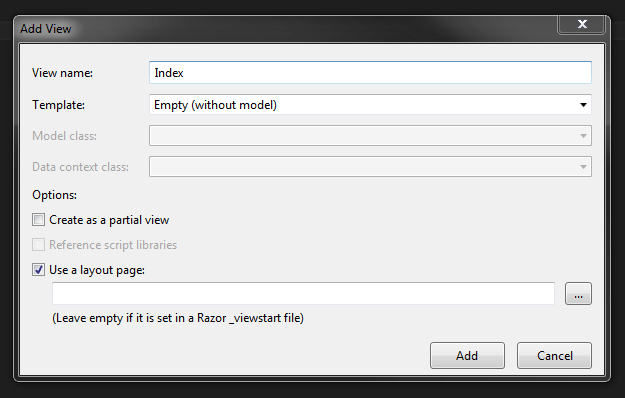
Creating a view
Now in your view add the needed references.
[html]
<script src="~/scripts/angular.min.js"></script>
<script src="~/scripts/angular-route.min.js"></script>
<script src="~/scripts/angular-aria.min.js"></script>
<script src="~/scripts/angular-animate.min.js"></script>
<script src="~/scripts/angular-messages.min.js"></script>
<script src="~/scripts/angular-material.js"></script>
<script src="~/scripts/svg-assets-cache.js"></script>
<script src="~/scripts/Home.js"></script>
[/html]
Once we add the references, we can call our Angular JS controller and change the view code as follows.
[html]
<div ng-controller="AutoCompleteCtrl as ctrl" layout="column" ng-cloak="" class="autocompletedemoBasicUsage" ng-app="MyApp" style="width: 34%;">
<md-content class="md-padding">
<form ng-submit="$event.preventDefault()">
<md-autocomplete md-no-cache="false" md-selected-item="ctrl.selectedItem" md-search-text="ctrl.searchText" md-items="item in ctrl.querySearch(ctrl.searchText)" md-item-text="item.display" md-min-length="0" placeholder="Search for products here!.">
<md-item-template>
<span md-highlight-text="ctrl.searchText" md-highlight-flags="^i">{{item.display}}</span>
</md-item-template>
<md-not-found>
No matching "{{ctrl.searchText}}" were found.
</md-not-found>
</md-autocomplete>
</form>
</md-content>
</div>
[/html]
Here md-autocomplete will cache the result we gets from database to avoid the unwanted hits to the database. This we can disable/enable by the help of md-no-cache. Now if you run your application, you can see our Web API call works fine and successfully get the data. But the page looks clumsy right? For this you must add a style sheet angular-material.css.
[html]
<link href="~/Content/angular-material.css" rel="stylesheet" />
[/html]
Now run your page again, I am sure you will get the output as follows.
Output
Angular_JS_Autocomplete_In_MVC_With_Web_API_Output_
Angular_JS_Autocomplete_In_MVC_With_Web_API_Output_With_Filter_
We have done everything!. That’s fantastic right? Have a happy coding.
Reference
Conclusion
Did I miss anything that you may think which is needed? Did you try Web API yet? Have you ever wanted to do this requirement? Could you find this post as useful? I hope you liked this article. Please share me your valuable suggestions and feedback.
Your turn. What do you think?
A blog isn’t a blog without comments, but do try to stay on topic. If you have a question unrelated to this post, you’re better off posting it on C# Corner, Code Project, Stack Overflow, Asp.Net Forum instead of commenting here. Tweet or email me a link to your question there and I’ll definitely try to help if I can.
Kindest Regards
Sibeesh Venu