Sibeesh Passion

Top Menu

  • Home
  • Search
  • About
  • Privacy Policy

Main Menu

  • Articles
    • Azure
    • .NET
    • IoT
    • JavaScript
    • Career Advice
    • Interview
    • Angular
    • Node JS
    • JQuery
    • Knockout JS
    • Jasmine Framework
    • SQL
    • MongoDB
    • MySQL
    • WordPress
  • Contributions
    • Medium
    • GitHub
    • Stack Overflow
    • Unsplash
    • ASP.NET Forum
    • C# Corner
    • Code Project
    • DZone
    • MSDN
  • Social Media
    • LinkedIn
    • Facebook
    • Instagram
    • Twitter
  • YouTube
    • Sibeesh Venu
    • Sibeesh Passion
  • Awards
  • Home
  • Search
  • About
  • Privacy Policy

logo

Sibeesh Passion

  • Articles
    • Azure
    • .NET
    • IoT
    • JavaScript
    • Career Advice
    • Interview
    • Angular
    • Node JS
    • JQuery
    • Knockout JS
    • Jasmine Framework
    • SQL
    • MongoDB
    • MySQL
    • WordPress
  • Contributions
    • Medium
    • GitHub
    • Stack Overflow
    • Unsplash
    • ASP.NET Forum
    • C# Corner
    • Code Project
    • DZone
    • MSDN
  • Social Media
    • LinkedIn
    • Facebook
    • Instagram
    • Twitter
  • YouTube
    • Sibeesh Venu
    • Sibeesh Passion
  • Awards
  • Linux Azure Function Isolated Dot Net 9 YAML Template Deployment

  • Build, Deploy, Configure CI &CD Your Static Website in 5 mins

  • Post Messages to Microsoft Teams Using Python

  • Get Azure Blob Storage Blob Metadata Using PowerShell

  • Deploy .net 6 App to Azure from Azure DevOps using Pipelines

AzureDatabaseMySQLVirtual Machine
Home›Azure›Back Up your ClearDB and restore in Azure Virtual Machine MySQL

Back Up your ClearDB and restore in Azure Virtual Machine MySQL

By SibeeshVenu
September 18, 2015
1314
0
Share:
Back Up And Restore Your Old MySQL Database to New Database

[toc]

Introduction

This article explains how you can back up and restore your clear db MySQL database in a virtual machine in Azure. If you are new to azure virtual machine, I strongly recommend you to read here: Create Virtual Machine In Azure. You can also find how to install MySQL in Azure Virtual Machine here Install MySQL in Azure . I hope you will like this.

If you are new to azure, I recommend you to read here: Azure

Background

I hope you read my articles related to Virtual Machines in azure. If not, please read those. I was being limited to use only 20 MB size since one of the MSDN subscription was providing me ClearDB. So I thought of creating a virtual machine and install MySQL. Then I restored my previous Database to my new Database. Here in this article, I will share you the steps to back up and restore your database.

Steps to Back Up your ClearDB and restore

Login to your azure portal https://manage.windowsazure.com

Login to your Azure Virtual Machine

Hope you have already installed MySQL in your Virtual Machine. If so, we are ready to go.

Go to start menu, and type MySQL, you will be shown some results. Click on the MySQL command line section.’

Back Up your ClearDB and restore in Azure Virtual Machine MySQL

Back Up your ClearDB and restore in Azure Virtual Machine MySQL

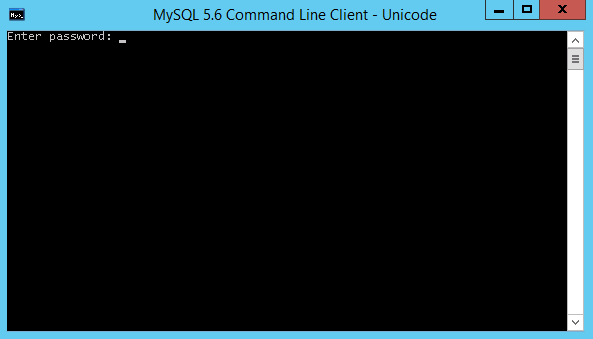
Provide your MySQL password.
Back Up your ClearDB and restore in Azure Virtual Machine MySQL

Back Up your ClearDB and restore in Azure Virtual Machine MySQL

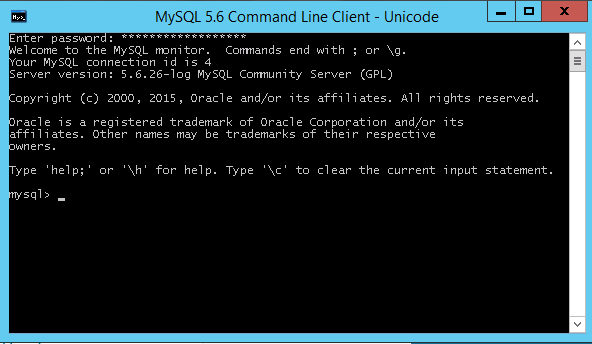
You will be getting a welcome message as shown below.
Back Up your ClearDB and restore in Azure Virtual Machine MySQL

Back Up your ClearDB and restore in Azure Virtual Machine MySQL

Create a database by executing a query as follows.

[sql]
CREATE DATABASE DATABASENAME;
[/sql]

Back Up your ClearDB and restore in Azure Virtual Machine MySQL

Back Up your ClearDB and restore in Azure Virtual Machine MySQL

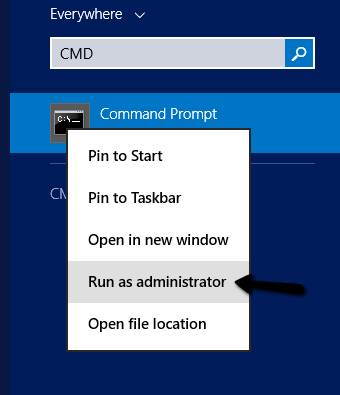
Go to start again, type cmd, right click and run as administrator on the result as follows.
Back Up your ClearDB and restore in Azure Virtual Machine MySQL

Back Up your ClearDB and restore in Azure Virtual Machine MySQL

Go to MySQL bin folder by executing the commands as shown in the below image.
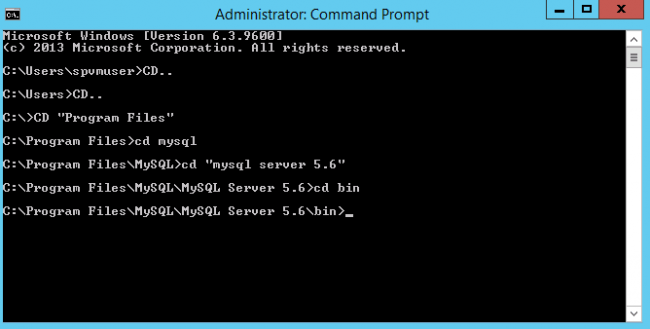
Back Up your ClearDB and restore in Azure Virtual Machine MySQL

Back Up your ClearDB and restore in Azure Virtual Machine MySQL

Before going through the back up process, we need to make sure that our website related files can be opened with on-line visual studio.

For that you need to follow the below steps.

Go to your windows azure portal, click on the web application you need to edit. Once you done that, you can see the dashboard for that web application. Click on the configure.
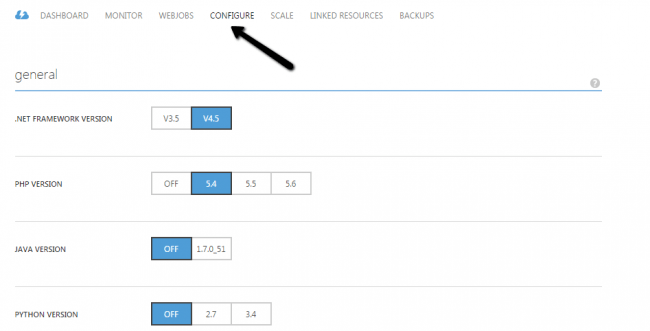
Back Up And Restore Your Old MySQL Database to New

Back Up And Restore Your Old MySQL Database to New Database

Scroll down and switch on edit in visual studio on-line option.
Back Up And Restore Your Old MySQL Database to New Database

Back Up And Restore Your Old MySQL Database to New Database

Now if you go to the options given in your dashboards right area, you can see edit in visual studio on-line option.

Back Up And Restore Your Old MySQL Database to New Database

Back Up And Restore Your Old MySQL Database to New Database

Just click on that option, and you will be opened visual studio on-line with your application files.
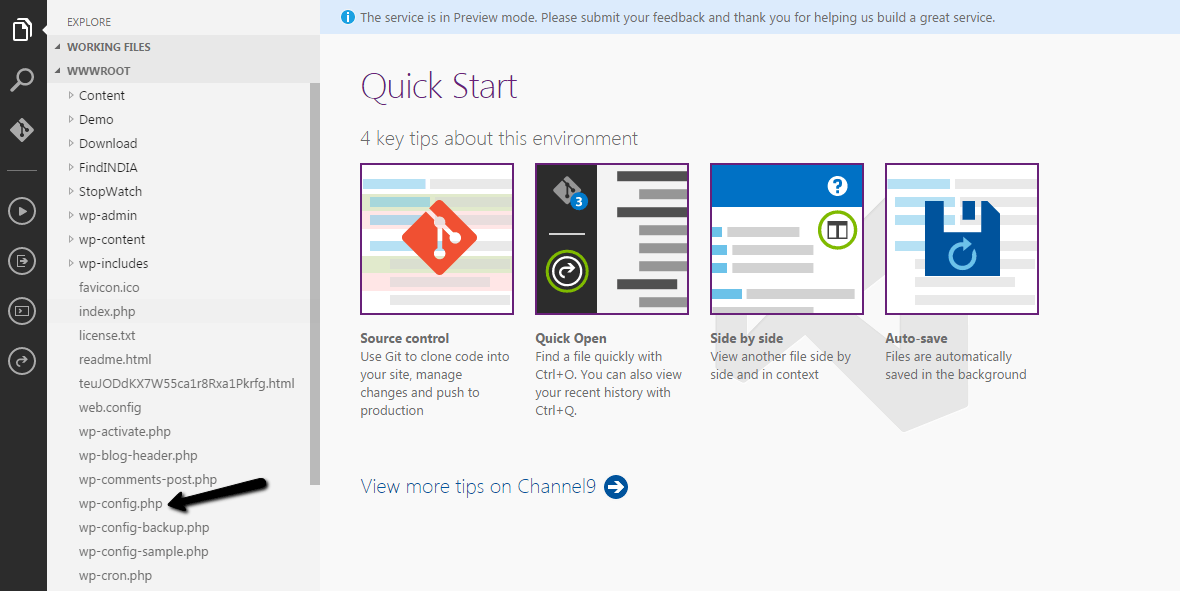
Back Up And Restore Your Old MySQL Database to New Database

Back Up And Restore Your Old MySQL Database to New Database

Now go back to your command prompt in your virtual machine and type a command as follows.

Back Up And Restore Your Old MySQL Database to New Database

Back Up And Restore Your Old MySQL Database to New Database

In the above command, what we do is, creating back up from our old database to a new file . Make sure that you have given the correct details.

1. User Name
2. Host Name
3. Database Name

These information you can get from the wp-config.php file from your web application folder. Remember we have enabled open with visual studio on-line option? Please go back to that and copy the needed information from wp-config.php file.

So once you execute that command you can get a script file in your c folder, In my case I gave the path as C and the file name as myolddb. So I got the script file as follows.
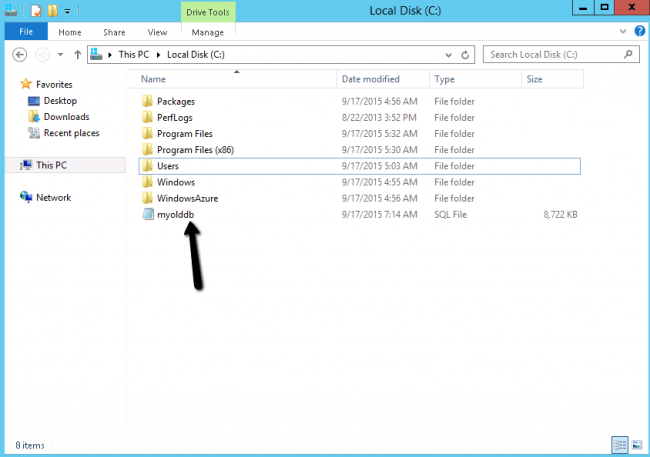
Back Up And Restore Your Old MySQL Database to New Database

Back Up And Restore Your Old MySQL Database to New Database

The next thing we need to do is, restoring the back up to our new database right? Hope you already got back up file.

Go to the command prompt again. Type the command as follows.

Back Up And Restore Your Old MySQL Database to New Database

Back Up And Restore Your Old MySQL Database to New Database

Please be noted that you need to give your new username you have created for your new MySQL database and the new database name here.

In my case vmmysqluser was the username and sibeeshpassion is the database name.

Now it is time to check the database is restored or not. We have some set of queries for that.

First of all change the database to your new database.

[sql]
use yournewdatabasename;
[/sql]

When you run the above query, you will get a message saying database changed.

Now we will see the tables inside this new database.

[sql]
show tables;
[/sql]

It will result the list of tables inside this new database.
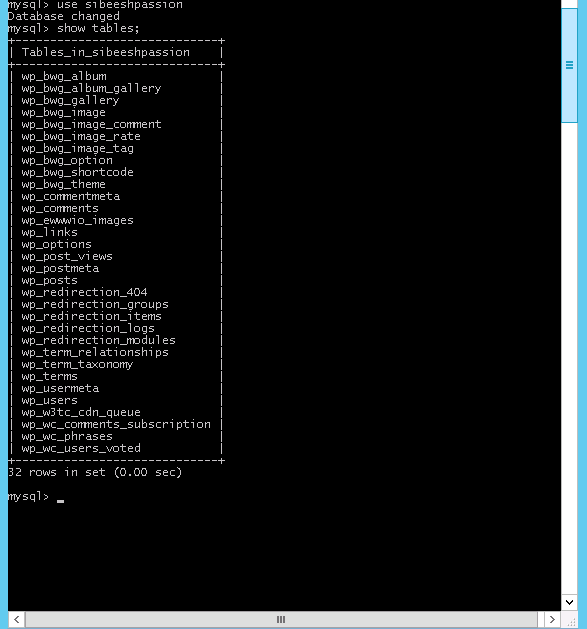
Back Up And Restore Your Old MySQL Database to New Database

Back Up And Restore Your Old MySQL Database to New Database

So we have successfully done back up and restoring our MySQL database in azure virtual machine.

Conclusion

Did I miss anything that you may think which is needed?.Have you ever tried virtual machine in azure?. If not, I strongly recommend that. Is this post helped you do back and restore your old database to new one? I hope you liked this article. Please share me your valuable suggestions and feedback.

Your turn. What do you think?

A blog isn’t a blog without comments, but do try to stay on topic. If you have a question unrelated to this post, you’re better off posting it on C# Corner, Code Project, Stack Overflow, Asp.Net Forum instead of commenting here. Tweet or email me a link to your question there and I’ll definitely try to help if I am able to.

Kindest Regards
Sibeesh Venu
TagsAzureAzure Virtual MachineBack Up your ClearDBDatabaseMySQLRestore ClearDBRestore MySQL
Previous Article

Install MySQL in Azure Virtual Machine

Next Article

Back Up Or Recovery Media Creation Of ...

0
Shares
  • 0
  • +
  • 0
  • 0
  • 0

SibeeshVenu

I am Sibeesh Venu, an engineer by profession and writer by passion. Microsoft MVP, Author, Speaker, Content Creator, Youtuber, Programmer.

Related articles More from author

  • DatabaseInterviewSQL

    SQL Interview Questions And Answers

    October 24, 2015
    By SibeeshVenu
  • Azure

    Linux Azure Function Isolated Dot Net 9 YAML Template Deployment

    April 27, 2025
    By SibeeshVenu
  • Integrating an existing Azure App Insights into your application
    Azure

    Integrate Azure App Insights in 1 Minute to .Net6 Application

    December 15, 2021
    By SibeeshVenu
  • AzureVideos

    Encrypt an Azure Virtual Machine VHD File in 5 Minutes

    September 3, 2019
    By SibeeshVenu
  • Azureazure devops

    Move Azure DevOps Work Items From One Organization to Another

    March 9, 2020
    By SibeeshVenu
  • Azure

    Show Recent Blog Posts in GitHub ReadMe using Azure Function

    July 20, 2020
    By SibeeshVenu
0

My book

Asp Net Core and Azure with Raspberry Pi Sibeesh Venu

YouTube

MICROSOFT MVP (2016-2022)

profile for Sibeesh Venu - Microsoft MVP

Recent Posts

  • React Native Android Release with Azure DevOps and Google Play Store
  • Linux Azure Function Isolated Dot Net 9 YAML Template Deployment
  • Build, Deploy, Configure CI &CD Your Static Website in 5 mins
  • Easily move data from one COSMOS DB to another
  • .NET 8 New and Efficient Way to Check IP is in Given IP Range
  • Async Client IP safelist for Dot NET
  • Post Messages to Microsoft Teams Using Python
  • Get Azure Blob Storage Blob Metadata Using PowerShell
  • Deploy .net 6 App to Azure from Azure DevOps using Pipelines
  • Integrate Azure App Insights in 1 Minute to .Net6 Application

Tags

Achievements (35) Angular (14) Angular 5 (7) Angular JS (15) article (10) Article Of The Day (13) Asp.Net (14) Azure (65) Azure DevOps (10) Azure Function (10) Azure IoT (7) C# (17) c-sharp corner (13) Career Advice (11) chart (11) CSharp (7) CSS (7) CSS3 (6) HighChart (10) How To (9) HTML5 (10) HTML5 Chart (11) Interview (6) IoT (11) Javascript (10) JQuery (82) jquery functions (9) JQWidgets (15) JQX Grid (17) Json (7) Microsoft (8) MVC (20) MVP (9) MXChip (7) News (18) Office 365 (7) Products (10) SQL (20) SQL Server (15) Visual Studio (10) Visual Studio 2017 (7) VS2017 (7) Web API (12) Windows 10 (7) Wordpress (9)
  • .NET
  • Achievements
  • ADO.NET
  • Android
  • Angular
  • Arduino
  • Article Of The Day
  • ASP.NET
  • Asp.Net Core
  • Automobile
  • Awards
  • Azure
  • Azure CDN
  • azure devops
  • Blockchain
  • Blog
  • Browser
  • C-Sharp Corner
  • C#
  • Career Advice
  • Code Snippets
  • CodeProject
  • Cognitive Services
  • Cosmos DB
  • CSS
  • CSS3
  • Data Factory
  • Database
  • Docker
  • Drawings
  • Drill Down Chart
  • English
  • Excel Programming
  • Exporting
  • Facebook
  • Fun
  • Gadgets
  • GitHub
  • GoPro
  • High Map
  • HighChart
  • How to
  • HTML
  • HTML5
  • Ignite UI
  • IIS
  • Interview
  • IoT
  • JavaScript
  • JQuery
  • jQuery UI
  • JQWidgets
  • JQX Grid
  • Json
  • Knockout JS
  • Linux
  • Machine Learning
  • Malayalam
  • Malayalam Poems
  • MDX Query
  • Microsoft
  • Microsoft ADOMD
  • Microsoft MVP
  • Microsoft Office
  • Microsoft Technologies
  • Microsoft Windows
  • Microsoft Windows Server
  • Mobile
  • MongoDB
  • Monthly Winners
  • MVC
  • MVC Grid
  • MySQL
  • News
  • Node JS
  • npm
  • Number Conversions
  • October 2015
  • Office 365
  • Office Development
  • One Plus
  • Outlook
  • Page
  • PHP
  • Poems
  • PowerShell
  • Products
  • Q&A
  • Raspberry PI
  • React
  • SEO
  • SharePoint
  • Skype
  • Social Media
  • Software
  • Spire.Doc
  • Spire.PDF
  • Spire.XLS
  • SQL
  • SQL Server
  • SSAS
  • SSMS
  • Storage In HTML5
  • Stories
  • Third Party Software Apps
  • Tips
  • Tools
  • Translator Text
  • Uncategorized
  • Unit Testing
  • UWP
  • VB.Net
  • Videos
  • Virtual Machine
  • Visual Studio
  • Visual Studio 2017
  • Wamp Server
  • Web API
  • Web Platform Installer
  • Webinars
  • WebMatrix
  • Windows 10
  • Windows 7
  • Windows 8.1
  • Wordpress
  • Writing

ABOUT ME

I am Sibeesh Venu, an engineer by profession and writer by passion. Microsoft MVP, Author, Speaker, Content Creator, Youtuber, Programmer. If you would like to know more about me, you can read my story here.

Contact Me

  • info@sibeeshpassion.com

Pages

  • About
  • Search
  • Privacy Policy
  • About
  • Search
  • Privacy Policy
© Copyright Sibeesh Passion 2014-2025. All Rights Reserved.
Go to mobile version